March 4, 2025
I have stewed on like a dozen blog posts for quite some time, and a good chunk of them boil down to write about that tool you love to use or *write about that tool you hate do not love to use.* These ideas stayed in the pot for a long, long time (so long I forgot I had even drafted some of these posts!). Rather than serve overcooked stew, let’s start fresh with some small plates. Today I’ll just focus on the positive - I could use more of that.
Developer tools I love to use
d2
If Marie Kondo were a programmer, d2 would be her favorite developer tool. This program sparks so much joy.
d2 is a text-based diagramming program that is easier and faster to write and prettier to look at than all its competitors. Don’t believe me? The team behind d2 also put together a site for head-to-head comparisons with alternatives.
I’ve used it in my READMEs, I use it at work, I use it whenever I can. I cannot endorse it enough. Here’s an example: If I want to create the SIP call flow from RFC 3261, I can do it in a matter of minutes.
Without any custom styling, I can write a sequence diagram like this:
direction: right
shape: sequence_diagram

a: Alice
ap: atlanta.com proxy
bp: biloxi.com proxy
b: Bob

a -> ap: INVITE F1
ap -> bp: INVITE F2
ap -> a: 100 Trying F3
bp -> b: INVITE F4
bp -> ap: 100 Trying F5
b -> bp: 180 Ringing F6
bp -> ap: 180 Ringing F7
ap -> a: 180 Ringing F8
b -> bp: 200 OK F9
bp -> ap: 200 OK F10
ap -> a: 200 OK F11
a -> b: ACK F12
a <-> b: Media Session
b -> a: BYE F13
a -> b: 200 OK F14
Which generates this diagram (yes, it’s a bit tall): 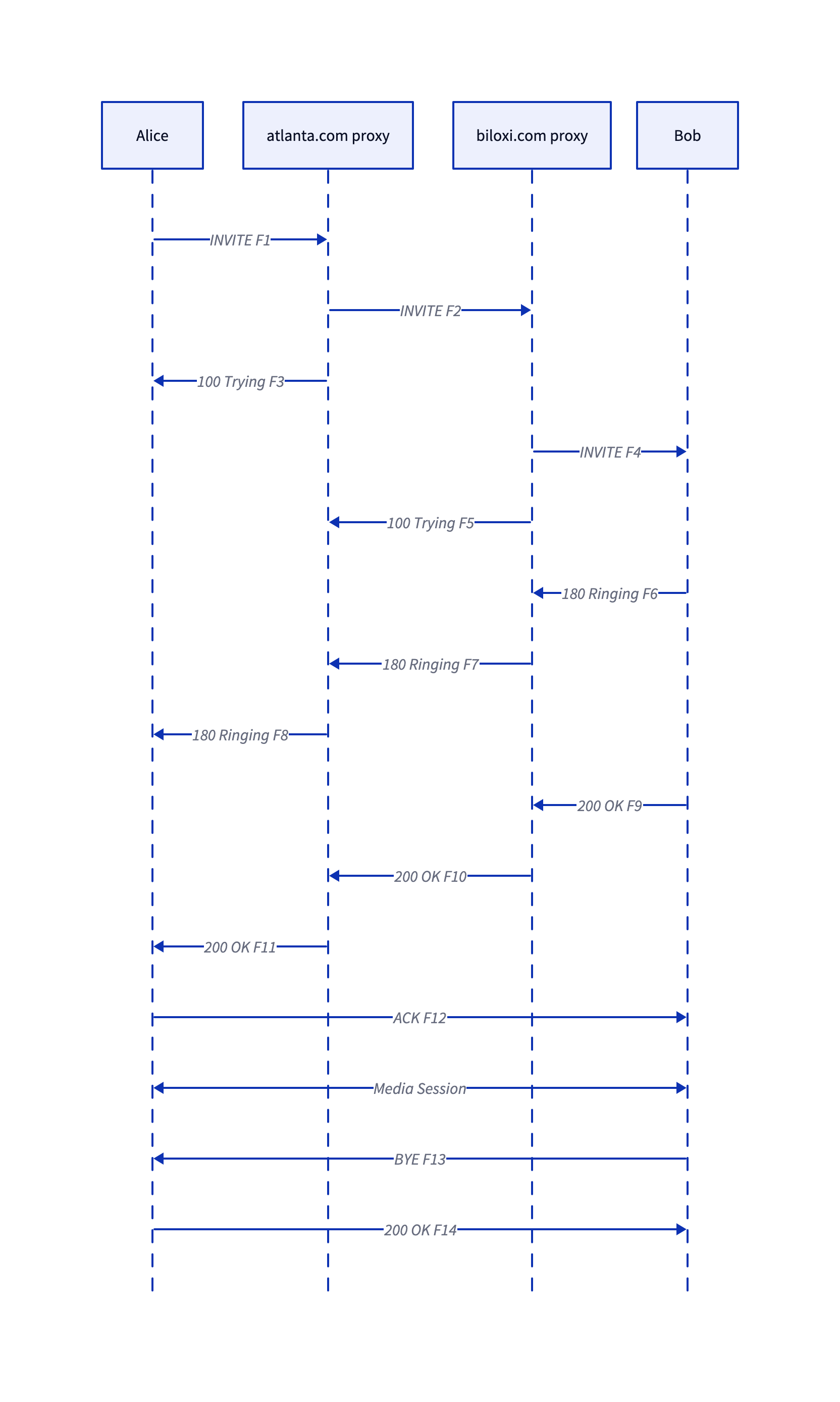
It’s pretty obvious how the code works, and even without any custom styling, the diagrams look great. Flat code like this also plays great in version control, which is a primary driver for text-based diagramming tools in the first place. Give it a spin sometime - If you don’t want to install the binary, you can always use the WASM version.
Neovim
It’s probably telling that I originally started this section with “Look, I’m not trying to argue.” But that’s not entirely true: I am trying to argue…with myself as of a few months ago.
I’ve been a regular Neovim user for something like 6 years. During most of that time, I suggested those newer to coding choose an IDE instead. I disagree now. A properly-managed Neovim configuration is a joy to extend and tweak, and it’s so much faster than VSCode.1
What do I mean by properly configured?
- Use Lua. You can do it, I promise. (Shoutout to Robbie for encouraging me to do it myself!)
- Set up
lazy.nvim. I’ve tried a few Neovim plugin managers; this one is the best. - Set up some language server protocol implementations. With LSP implementations like
pyright, you get most of the interactivity of an IDE right in your vim session. This takes some upfront cost to configure, but once you have them, developing is a breeze. This is so essential I think it supersedes tinkering around with any other plugins. - Tinker around with other plugins! Come on, you knew this was coming. Right now, I mostly just use
conformfor file formatting. Unlike with my oldvimscript-based configuration, though, it is so simple for me to try out new plugins that I can mix and match in a matter of minutes with only a few lines of code.
For a simple example of how to set lazy.nvim and manage LSP implementations and other packages, see my dotfiles or search around for other reference implementations.
Obsidian
I have tried dozens of note-taking apps over the years and nothing supplanted pen-and-paper for me. Obsidian changes that. The notes are markdown, the notes are data, the notes seamlessly link to each other. I feel like the sky is the limit here and that I am barely above sea level. The plugin system is breathtaking. Do you know how hard it is to get someone who just pitched Neovim to recommend an Electron app?2
The bar is damn high. Obsidian raises it. Oh, and it’s now free for professional use, too.The plugin ecosystem is more important here than it is for me with Neovim. Right now, I use a few plugins together to maintain a daily note directory, where each day gets its own types of notes: meetings, coding, messages, and documents. I love using folders to organize these; I find it much clearer to have one note per meeting than to try to collate and classify my thoughts while I’m recording them.
The big idea here is to use the tasks plugin to surface all TODO items from any of these documents into one place. This creates a sort of dashboard for my thoughts and words. For now, it looks like this: 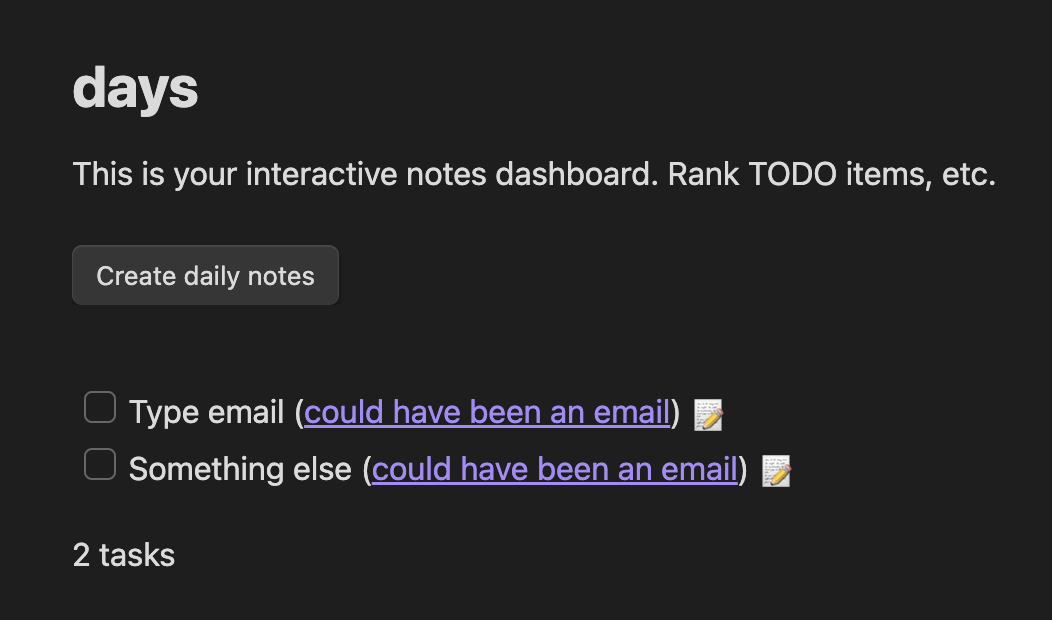
If this sounds interesting to you, I’ve published an example vault that you can try out for yourself (once you install the required plugins).
I will say I’m definitely not an expert here yet. I want to get better at linking information conceptually once I’ve actually recorded it.
uv
uv makes the worst parts of Python painless. It is blazing fast, simple, and excellent. uv venv and uv pip install are two of my most-run commands. Use it, cherish it, spread the good news to your friends and family. Here’s a great article if you’re looking for a place to start.
pytest
I was years into writing Python before I wrote my first pytest test. It was years after that I learned how to use pdb. I did not know, until a month ago, that these two things can go great together. Run pytest --pdb to launch an interactive debugger within your test session. You can even set a lazy breakpoint in your code without imports with a quick assert False. This is incredible, and plays so well to Python’s strengths. A few dir() calls here and there and I can write tests an order of magnitude faster than I could before.
I also want to mention how many powerhouse fixtures come baked right into the framework: caplog for testing logging, capsys for testing other side effects, and tmpdir for making temporary directories have become some of my most-used tools.
ripgrep and fd
When I started programming professionally, I never imagined using the command line. I pictured a solitary, well-defined codebase that I’d primarily work with through one lanugage-specific IDE. I have seen enough now that I don’t think code like that exists.
Using the command line can feel intimidating. I think that’s arguably intentional: We’re reliant on dozens of tools built decades ago with minimal, if not hostile, user interfaces. There’s work being done to make this a better experience for everyone, though. Hopping between directories and getting your bearings is made so much easier with the implausibly fast ripgrep. ripgrep searches all the files under your current directory for a given string, just like grep -R. It’s a powerful tool for finding uses of classes, hunting down an error, and even searching your notes. Start using it and you won’t stop.
fd also gets a mention here too, as basically ripgrep for files. It deserves bonus points because it is so much easier to use than vanilla find. I often find myself dancing between the two, spitting out quick searches so fast that I might as well be in a fine-tuned IDE.
jq, yq, and difftastic
If you find yourself working with JSON, you won’t regret learning some basic jq. jq is a query system for JSON objects, providing a lot of functionality for working with JSON without firing up a programming language. yq is, in my opinion, primarily useful for converting YAML into a reasonable format (JSON). Use yq -r <file.yaml> -o j | jq to make sense of the world’s strangest templating language.
I want to mention difftastic here, too, because I’m often using it in conjunction with jq --sort-keys to compare highly nested data - JSON, YAML, etc. This is a really powerful workflow that will save you from writing a lot of repetitive scripts. Also, difftastic makes for much better git diffs.
Liftosaur
Okay, okay, okay. I know this post is about “developer tools” I use in 2025, but I have to end with my weight training app. Liftosaur is a weight tracking app for coders. Features include:
- A beautiful, simple syntax for structuring workout splits and progressions
- Open source code
- The option to self-host backups
- A cute dinosaur mascot(!)

Cuteness aside, you can see the website for the great UI of this app. I’m going to focus here on the ability to program workouts.
Here’s a subset of my current split, presented as code (do NOT pay attention to the weights please 🙈)
# Week 1
## Upper #1
Seated Row, Leverage Machine / 3x8-10 / 110lb / warmup: 1x10 45lb / progress: lp(5lb)
// Use small bar, overhead. Lean into it. Get stable before you start the lift
Triceps Extension, Cable / 2x8-10 / 57.5lb / warmup: 1x5 20lb / progress: lp(5lb)

## Leg #1
Seated Leg Curl / 3x8-10 / 160lb / warmup: 1x10 80lb / progress: lp(5lb)
Hip Abductor, Cable / 3x10-12 / 20lb / warmup: 1x10 10lb / progress: lp(5lb)
Seated Leg Press / 1x4, 1x6, 1x8 / 240lb / warmup: 2x10 150lb / progress: lp(5lb)
// 2-3s negative
Leg Extension / 3x10-12 / 140lb / warmup: 1x10 100lb / progress: lp(5lb)
Each line represents an exercise, with optional exercise text included in a comment syntax // above each exercise.
Within an exercise, you have the exercise name (including machine, if applicable), the sets and reps, the weight, and subsequent sections for the warmup sets and progression options. If you’re more ambitious, you can code your own progressions and reps from scratch:
// Progression example
Overhead Press / 2x5 67.5lb, 1x5+ 67.5lb / warmup: 1x5 45% / progress: custom(increase: 2.5lb) {~
  if (completedReps[ns] >= reps[ns]) {
    if (completedReps[ns] >= 10) {
      weights += state.increase * 2
    } else {
      weights += state.increase
    }
  } else if (completedReps[ns] < reps[ns]) {
    weights = weights[ns] * 0.9
  }
~}

// Reps example
Reverse Fly, Leverage Machine / 3x5 / 20lb / update: custom() {~
  if (setIndex == 1) {
       reps = 4
    } else if (setIndex == 2) {
      // 3-3+ reps
       sets(2, 2, 3, 3, 1, weights[1], 0, 0, 0)
    }
~}
This is a hacker’s playground, but unlike many of the other tools I use, I would recommend this app to non-coders, too. There’s a fully-featured GUI for editing workouts if you don’t want to use code, and there are so many great quality of life features: support for different equipment (with different weights available), support for different gyms with different equipment, support for custom exercises, and the killer feature: Automatic plate math calculations. After a few leg sets, I’m approximating a 1 Intelligence Fallout Run, and therefore this feature has probably saved me hours over the last year.
This is yet another largely open source, largely solo developer project, so show it some love. I love this app so much I am trying to get the developer to support referrals so he can better understand how much I (specifically) love this app.
Request
That’s all I’ve got for now! If you read this far and wouldn’t mind thinking of me just a little bit more, could you reach out and let me know what you thought? It took me a lot of tries to write this, and to be blunt, I could use some encouragement to keep trying.
Footnotes
1I tried to come up with a quantitative answer here, but I couldn't. hyperfine is a great tool to test program execution speed, but my editor is open and can accept inputs is not something I can easily tie to a program ending. Claude led me to look into osascript, which is close, but VSCode boots the Electron app almost a second before it actually accepts inputs. If anyone wants to look at this, let me know!
2I am aware of obsidian.nvim. I don't get it.